1. Introduction
At the start of the new years, we all have our dreams and hopes on how the year will turn out to be. We all have our passions we want to fill out, goals to complete, achievements to unlocked only to have them dashed by the end of the year leaving us wondering on what happened.
To me, the problem is that we simply have too much control and free time to the point that it’s exhausting and confusing trying to figure out and to build up our habits and routines.
I have been getting into Old School RuneScape recently and there’s been a small, niche community with a unique approach to having too much things to do inside the game. Simply don’t do them.
Instead, they roll a dice on a list of random accomplishments and focus on only one goal.
That led me to think… Why not use this system in real life?
2. The System
Well, truth be told, the goals we set during New Years are simply too vague and too big to actually be actionable. Let’s be realistic. Read more? Lose 10 kgs? These tasks are not actionable.
That’s why in my system, every task is designed to be actionable within 1 week. That allows us to reflect on the progress towards your new years resolution, allowing us to adjust the task to be more difficult or easier based on how you accomplish.
Because the truth is, getting started is a lot better than being stuck.
Right now, it’s just a spreadsheet with a vba code.
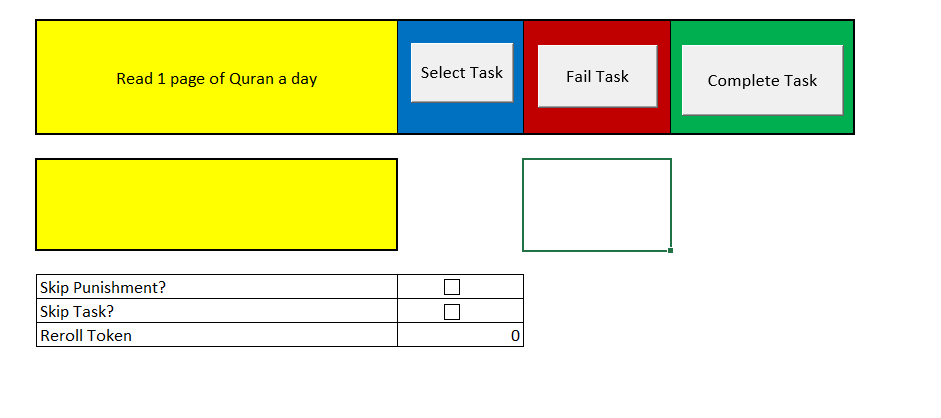
Then, in a different worksheet, I put the list of tasks I would like to work on in a weekly basis:
| Tasks | Category |
|---|---|
| Publish 1 blog post per day for 5 days | Tech |
| Implement a significant feature on the blog | Tech |
| Learn something related to programming | Tech |
| Publish something to an open source project | Tech |
| Memorize 1 short surah | Religious |
| Walk 10,000 steps per day for 5 days | Health |
| Read 1 page of Quran a day | Religious |
| Read 1 page of a book a day | Creative |
| Create 1 visual design | Creative |
| Make 3 sketches/drawings | Creative |
| Write and sign up to deliver a speech (if fail to do the speech, do extra punishment that week) | Creative |
| Check out Astro themes using Obsidian publish | Tech |
Then, I use VBA to get a random task each week from the list.
Sub SelectRandomTask()
    Dim rng As Range
    Dim cellCount As Long
    Dim randomIndex As Long

    ' Hardcoded range (change as needed)
    Set rng = ThisWorkbook.Sheets("Tasks").Range("A2:A13")


    ' Initialize random generator
    Randomize

    ' Pick random cell
    randomIndex = Int(rng.Cells.Count * Rnd) + 1

    ' Select it
    ' rng.Cells(randomIndex).Select

    ' Debug
    MsgBox "Selected: " & rng.Cells(randomIndex).Value

    ' Write Selected cell
    ThisWorkbook.Sheets("Dashboard").Range("B2").Value = rng.Cells(randomIndex).Value

End Sub
Conclusion
So, weekly basis, I will update on my thread on my progress. You can view the progress here: My Thread Profile
Hopefully, this will be the start to a great and productive year to everyone reading.